
- Page Types have been created using Sitecore's Page Branches feature which lets us define pre-configured pages for Content Authors.
- These page types can be used as a template to create pages, and are available in the insert options list on the website.
- When a page is created using these templates then it will already have the Page Design set, predefined components added and their data source items created locally.
- Generic One Column Page Type creates a page where the main area is One Column with Hero and Breadcrumb components.
- This page branch is based on One Column Page template which inherits the Page template which has all the custom metadata fields.
- Pre-defined Component details:
- Base Hero variant of EH Hero is applicable here; local data source item name - Hero Banner.
- EH Breadcrumb has been added.
- Header Alert, Header, and Footer are rendered using Generic One Column page design.
- CAs have the ability to add new components and even remove/edit the pre-rendered ones on a specific page in EE.
- A screenshot of the page is shown HERE, the pre-rendered components are highlighted in the image.

Generic One Column Page Type

Developer Notes
Content Author Notes
This is a page template that uses a one column layout.
To create a new page with this template:
1. Right click on the parent item that you would like the page under.
2. Select Insert
3. Select Generic One Column Page
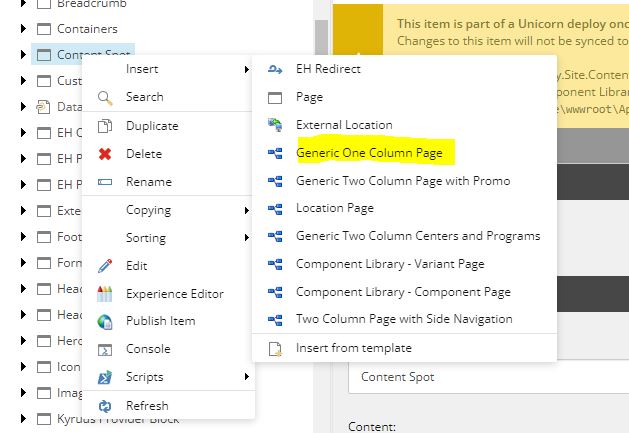
4. Enter the page name and click "Ok".
Requirements
Generic One Column Page:
- The Generic One Column Page is editable and will be used by Content Authors for any generic landing type pages.
- The Generic One Column Page will inherit from: Base Page Template
- This page type will consist of the following components:
- The CA should have the flexibility to add additional components as needed for content.
- For styles used please see: Designs